- SQLiteStudio的取得及其相關功能,可以參閱:
SQLite管理工具SQLite Studio https://sql.bod.idv.tw/2021/01/sqlitesqlite-studio.html - 在這網站內的SQL學習,會以Chinook範例資料庫,當資料操作的資料來源。
如何取得Chinook?
https://github.com/lerocha/chinook-database
https://github.com/lerocha/chinook-database/tree/master/ChinookDatabase/DataSources
https://archive.codeplex.com/?p=chinookdatabase
可以參考:取得SQLite版本的Chinook範例資料庫 https://sql.bod.idv.tw/2021/01/sqlitechinook.html - 這裡除了準備Chinook Sample Database外,我們將在SQLiteStudio新增建立一個測試資料庫TestWind.sqlite的資料庫。
Databases區塊內按滑鼠右鍵→Database→Add a database
或 Database→Add a database

按『+』鈕,選擇存放的資料夾位置,輸入資料庫檔名:TestWind.sqlite,存檔。
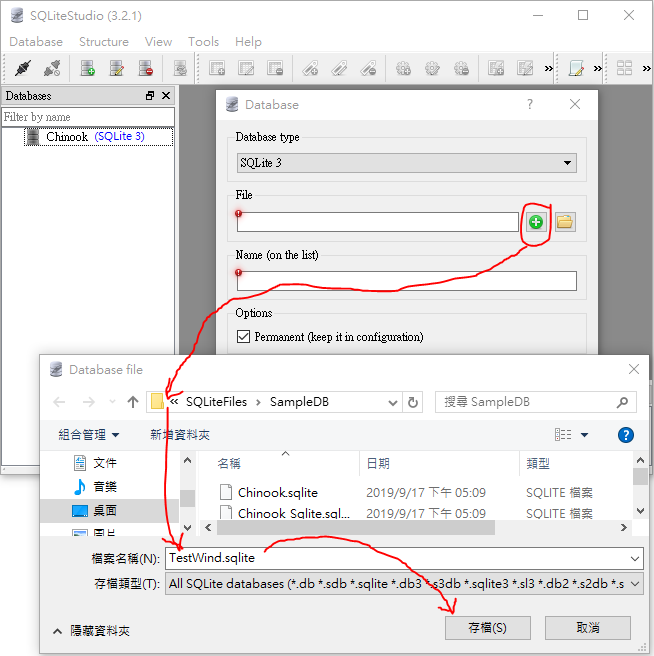
OK,建立TestWind資料庫。

確認SQLiteStudio的資料庫區塊,已有:Chinook, TestWind
選取TestWind,Connect to the database

2021-01-23
用SQLiteStudio建立SQL學習環境

2021-01-22
SQL指令及主要分類(DDL, DML, DCL, TCL)
SQL指令及主要分類(DDL, DML, DCL, TCL):
- DDL (Data Definition Language)
- 用來定義資料庫結構的指令,例如:綱要schemas, 資料表tables ...。
- CREATE, DROP, ALTER, RENAME, TRUNCATE
- DML (Data Manipulation Language)
- 用來處理資料庫中的資料的指令,一般資料的新增、修改、刪除、查詢等運算,都是屬於DML指令類。
- SELECT, INSERT, UPDATE, DELETE
- DCL (Data Control Language)
- 用來控制管理資料庫的使用權限及相關安全設定的管控指令。
- GRANT, REVOKE
- TCL is Transaction Control Language
- 管理資料庫中交易的指令。
- START TRANSACTION (BEGIN, BEGIN WORK), COMMIT, ROLLBACK
SQLite3的資料類型
- SQLite的官網提到,目前大部份的SQL資料庫引擎(除了SQLite之外)都使用靜態、嚴格的資料類型。 使用靜態類型時,資料值的數據類型由儲存這項資料的資料欄位型態決定。
SQLite的資料類型,使用更通用的動態類型系統(dynamic type system)。 在SQLite中,資料值的資料類型與資料值本身相關聯,而不是與存放資料的資料欄位型態相關聯。 SQLite的動態類型系統向下相容其他資料庫引擎中更常見的靜態類型系統,因為在靜態類型資料庫上工作的SQL語句應該在SQLite中以相同的方式工作。 但是,SQLite中的動態類型允許它執行傳統的嚴格類型資料庫中無法實現的操作。
- 每一個存放在SQLite資料庫中的資料值,都具有下列的資料型態中的一個資料類型:
- NULL : 空值。
- INTEGER : 整數。是帶有正負值的整數,可能會使用1, 2, 3, 4, 6, 8個位元組(Bytes)來存放資料,實際使用的Bytes數,以存放的值來決定。
- REAL : 浮點數值。以 8 Bytes來存放IEEE浮點數。
- TEXT : 文字字串值。以資料庫的文字編碼方式:UTF-8, UTF-16BE, UTF-16LE來儲存資料。
- BLOB : 二進位大型物件(Binary Large OBject)。
- 沒有Boolean值的資料儲存型別,SQLite3用0來儲存False(假),用1來儲存True(真)。
- 沒有日期(Date)、時間(Time)的資料儲存型別,SQLite內建的日期和時間函數,將日期和時間存儲為TEXT,REAL或INTEGER值。
如果是TEXT,存為ISO8601字符串(“YYYY-MM-DD HH:MM:SS.SSS”)。
如果是REAL,是記錄一個Julian的日期數,是西元前4714年11月24日格林威治中午以來的天數。
如果是INTEGER,是紀錄1970-01-01 00:00:00 UTC以來的秒數(Unix Time)。 - 近似型別(Type Affinity)
SQLite3資料庫中的每一個資料欄位,都會被指定為下列型別之一的近似型別:TEXT, NUMERIC, INTEGER, REAL, BLOB。
欄位近似型別的決定規則(Determination Of Column Affinity),規則依序如下:
- 宣告的資料類型包含字串“INT”,視為INTEGER 的近似型別。
- 宣告的資料類型包含字串“CHAR”、“CLOB”或“TEXT”,視為TEXT的近似型別。 VARCHAR / NVARCHAR 類型包含字串“CHAR”,視為TEXT的近似型別。
- 宣告的類型包含字串“BLOB”、或未指定類型,視為BLOB的近似型別。
- 宣告的類型包含字串“REAL”、“FLOA”或“DOUB”,視為REAL的近似型別。
- 上述似規則以外,視為NUMERIC的近似型別。
- 近似型別歸類舉例:
CREATE TABLE宣告或CAST5轉換式 歸類 規則 INT, INTEGER, TINYINT, SMALLINT, MEDIUMINT, BIGINT, UNSIGNED BIG INT, INT2, INT8 INTEGER i CHARACTER(20), VARCHAR(255), VARYING CHARACTER(255), NCHAR(55), NATIVE CHARACTER(70), NVARCHAR(100), TEXT,CLOB TEXT ii BLOB, no datatype specified BLOB iii REAL, DOUBLE, DOUBLE PRECISION, FLOAT REAL iv NUMERIC, DECIMAL(10,5), BOOLEAN, DATE, DATETIME NUMERIC v - SQLite Studio資料欄位可以選擇的選項:
BIGINT, BLOB, BOOLEAN, CHAR, DATE, DATETIME, DECIMAL, DOUBLE, INTEGER, INT, NONE, NUMERIC, REAL, STRING, TEXT, VARCHAR

參考資料:Datatypes In SQLite Version 3 https://www.sqlite.org/datatype3.html
取得SQLite版本的Chinook範例資料庫
下載取得Chinook範例資料庫:
https://github.com/lerocha/chinook-database/blob/master/ChinookDatabase/DataSources/Chinook_Sqlite.sqlite
簡化資料庫名稱,把Chinook_Sqlite.sqlite 修改為 Chinook.sqlite
開啟SQLite Studio,以SQLite Studio開啟資料庫Chinook.sqlite :
把資料庫檔案拖曳到SQLite Studio的區塊內,放開滑鼠,會開啟Database小視窗,按下OK鈕,就可以成功開啟這個資料庫了。
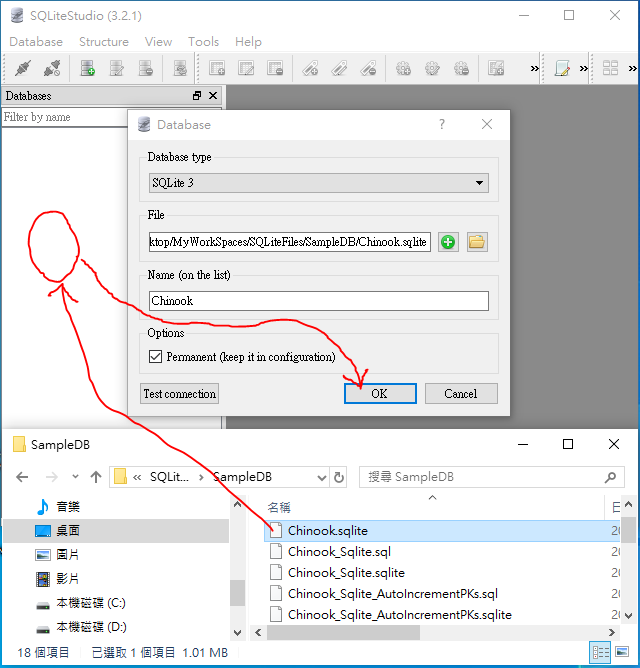
可以透過SQLite Studio查看Chinook.sqlite的資料表、資料欄位、Primary Key、索引(Index)、資料內容、Constraint(限制條件) ...
將資料庫檔案拖曳到Database區塊內後,Database→Connect to the database
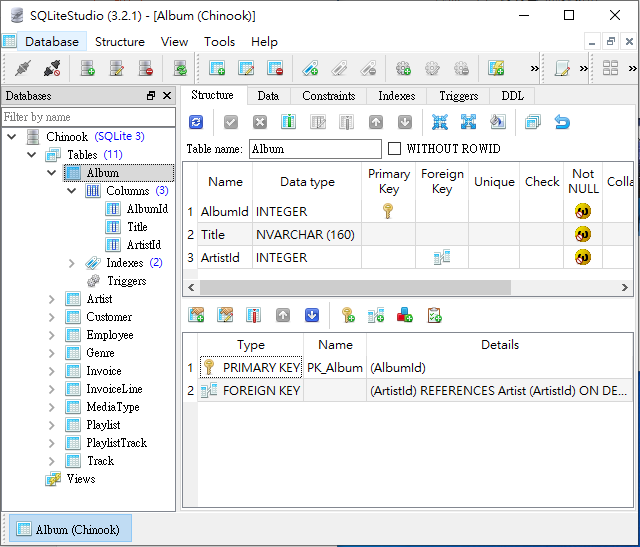
Chinook資料庫內,共包含11個資料表:Album, Artist, Customer, Employee, Genre, Invoice, InvoiceLine, MediaType, Playlist, PlaylistTrack, Track,每個資料表內所包含的資料欄位,說明如下:(以Chinook_sqlite.sql的CREATE TABLE來查看資料表的資料欄位內容)
https://github.com/lerocha/chinook-database/blob/master/ChinookDatabase/DataSources/Chinook_Sqlite.sqlite
簡化資料庫名稱,把Chinook_Sqlite.sqlite 修改為 Chinook.sqlite
開啟SQLite Studio,以SQLite Studio開啟資料庫Chinook.sqlite :
把資料庫檔案拖曳到SQLite Studio的區塊內,放開滑鼠,會開啟Database小視窗,按下OK鈕,就可以成功開啟這個資料庫了。
可以透過SQLite Studio查看Chinook.sqlite的資料表、資料欄位、Primary Key、索引(Index)、資料內容、Constraint(限制條件) ...
將資料庫檔案拖曳到Database區塊內後,Database→Connect to the database
Chinook資料庫內,共包含11個資料表:Album, Artist, Customer, Employee, Genre, Invoice, InvoiceLine, MediaType, Playlist, PlaylistTrack, Track,每個資料表內所包含的資料欄位,說明如下:(以Chinook_sqlite.sql的CREATE TABLE來查看資料表的資料欄位內容)
- Album :
CREATE TABLE [Album]
(
[AlbumId] INTEGER NOT NULL,
[Title] NVARCHAR(160) NOT NULL,
[ArtistId] INTEGER NOT NULL,
CONSTRAINT [PK_Album] PRIMARY KEY ([AlbumId]),
FOREIGN KEY ([ArtistId]) REFERENCES [Artist] ([ArtistId])
ON DELETE NO ACTION ON UPDATE NO ACTION
);
- Artist :
CREATE TABLE [Artist]
(
[ArtistId] INTEGER NOT NULL,
[Name] NVARCHAR(120),
CONSTRAINT [PK_Artist] PRIMARY KEY ([ArtistId])
);
- Customer :
CREATE TABLE [Customer]
(
[CustomerId] INTEGER NOT NULL,
[FirstName] NVARCHAR(40) NOT NULL,
[LastName] NVARCHAR(20) NOT NULL,
[Company] NVARCHAR(80),
[Address] NVARCHAR(70),
[City] NVARCHAR(40),
[State] NVARCHAR(40),
[Country] NVARCHAR(40),
[PostalCode] NVARCHAR(10),
[Phone] NVARCHAR(24),
[Fax] NVARCHAR(24),
[Email] NVARCHAR(60) NOT NULL,
[SupportRepId] INTEGER,
CONSTRAINT [PK_Customer] PRIMARY KEY ([CustomerId]),
FOREIGN KEY ([SupportRepId]) REFERENCES [Employee] ([EmployeeId]) ON DELETE NO ACTION ON UPDATE NO ACTION
);
- Employee :
CREATE TABLE [Employee]
(
[EmployeeId] INTEGER NOT NULL,
[LastName] NVARCHAR(20) NOT NULL,
[FirstName] NVARCHAR(20) NOT NULL,
[Title] NVARCHAR(30),
[ReportsTo] INTEGER,
[BirthDate] DATETIME,
[HireDate] DATETIME,
[Address] NVARCHAR(70),
[City] NVARCHAR(40),
[State] NVARCHAR(40),
[Country] NVARCHAR(40),
[PostalCode] NVARCHAR(10),
[Phone] NVARCHAR(24),
[Fax] NVARCHAR(24),
[Email] NVARCHAR(60),
CONSTRAINT [PK_Employee] PRIMARY KEY ([EmployeeId]),
FOREIGN KEY ([ReportsTo]) REFERENCES [Employee] ([EmployeeId])
ON DELETE NO ACTION ON UPDATE NO ACTION
);
- Genre :
CREATE TABLE [Genre]
(
[GenreId] INTEGER NOT NULL,
[Name] NVARCHAR(120),
CONSTRAINT [PK_Genre] PRIMARY KEY ([GenreId])
);
- Invoice :
CREATE TABLE [Invoice]
(
[InvoiceId] INTEGER NOT NULL,
[CustomerId] INTEGER NOT NULL,
[InvoiceDate] DATETIME NOT NULL,
[BillingAddress] NVARCHAR(70),
[BillingCity] NVARCHAR(40),
[BillingState] NVARCHAR(40),
[BillingCountry] NVARCHAR(40),
[BillingPostalCode] NVARCHAR(10),
[Total] NUMERIC(10,2) NOT NULL,
CONSTRAINT [PK_Invoice] PRIMARY KEY ([InvoiceId]),
FOREIGN KEY ([CustomerId]) REFERENCES [Customer] ([CustomerId])
ON DELETE NO ACTION ON UPDATE NO ACTION
);
- InvoiceLine :
CREATE TABLE [InvoiceLine]
(
[InvoiceLineId] INTEGER NOT NULL,
[InvoiceId] INTEGER NOT NULL,
[TrackId] INTEGER NOT NULL,
[UnitPrice] NUMERIC(10,2) NOT NULL,
[Quantity] INTEGER NOT NULL,
CONSTRAINT [PK_InvoiceLine] PRIMARY KEY ([InvoiceLineId]),
FOREIGN KEY ([InvoiceId]) REFERENCES [Invoice] ([InvoiceId])
ON DELETE NO ACTION ON UPDATE NO ACTION,
FOREIGN KEY ([TrackId]) REFERENCES [Track] ([TrackId])
ON DELETE NO ACTION ON UPDATE NO ACTION
);
- MediaType :
CREATE TABLE [MediaType]
(
[MediaTypeId] INTEGER NOT NULL,
[Name] NVARCHAR(120),
CONSTRAINT [PK_MediaType] PRIMARY KEY ([MediaTypeId])
);
- Playlist :
CREATE TABLE [Playlist]
(
[PlaylistId] INTEGER NOT NULL,
[Name] NVARCHAR(120),
CONSTRAINT [PK_Playlist] PRIMARY KEY ([PlaylistId])
);
- PlaylistTrack :
CREATE TABLE [PlaylistTrack]
(
[PlaylistId] INTEGER NOT NULL,
[TrackId] INTEGER NOT NULL,
CONSTRAINT [PK_PlaylistTrack] PRIMARY KEY ([PlaylistId], [TrackId]),
FOREIGN KEY ([PlaylistId]) REFERENCES [Playlist] ([PlaylistId])
ON DELETE NO ACTION ON UPDATE NO ACTION,
FOREIGN KEY ([TrackId]) REFERENCES [Track] ([TrackId])
ON DELETE NO ACTION ON UPDATE NO ACTION
);
- Track
CREATE TABLE [Track]
(
[TrackId] INTEGER NOT NULL,
[Name] NVARCHAR(200) NOT NULL,
[AlbumId] INTEGER,
[MediaTypeId] INTEGER NOT NULL,
[GenreId] INTEGER,
[Composer] NVARCHAR(220),
[Milliseconds] INTEGER NOT NULL,
[Bytes] INTEGER,
[UnitPrice] NUMERIC(10,2) NOT NULL,
CONSTRAINT [PK_Track] PRIMARY KEY ([TrackId]),
FOREIGN KEY ([AlbumId]) REFERENCES [Album] ([AlbumId])
ON DELETE NO ACTION ON UPDATE NO ACTION,
FOREIGN KEY ([GenreId]) REFERENCES [Genre] ([GenreId])
ON DELETE NO ACTION ON UPDATE NO ACTION,
FOREIGN KEY ([MediaTypeId]) REFERENCES [MediaType] ([MediaTypeId])
ON DELETE NO ACTION ON UPDATE NO ACTION
);
2021-01-21
範例資料庫(Sample Database)
使用現成的範例資料庫,可以有效幫助SQL語法的學習,微軟在GitHub上釋出多個範例資料庫(Sample Database):
除了上述微軟提供的範例資料庫,還有一個常用來替代Northwind的資料庫:Chinook
Chinook : Sample database for SQL Server, Oracle, MySQL, PostgreSQL, SQLite, DB2
下載取得Chinook的資料:
https://github.com/lerocha/chinook-database/tree/master/ChinookDatabase/DataSources

Chinook 範例資料庫的Database diagram:
http://schemaspy.org/sample/relationships.html
http://schemaspy.org/sample/diagrams/summary/relationships.real.compact.png
http://schemaspy.org/sample/diagrams/summary/relationships.real.large.png
- Official Microsoft GitHub Repository containing code samples for SQL Server
https://github.com/microsoft/sql-server-samples
https://github.com/microsoft/sql-server-samples/tree/master/samples/databases - wide-world-importers
- contoso-data-warehouse
- AdventureWorks
- Northwind
- Pubs
- 範例資料庫的資料庫關聯圖(database diagram)(實體關聯圖 ER Diagram)
- AdventureWorks OLTP Database Diagram https://improveandrepeat.com/wp-content/uploads/2018/12/AdvWorksOLTPSchemaVisio.png
- An ER Diagram for the Northwind Sample Database
https://documentation.red-gate.com/dms6/files/49646072/49646073/3/1559655630714/ERDiagramNorthwind.png - An ER Diagram for the PUBS Sample Database
https://documentation.red-gate.com/dms6/files/49646075/49646076/2/1559655574834/ERDiagramPUBS.png
除了上述微軟提供的範例資料庫,還有一個常用來替代Northwind的資料庫:Chinook
Chinook : Sample database for SQL Server, Oracle, MySQL, PostgreSQL, SQLite, DB2
下載取得Chinook的資料:
https://github.com/lerocha/chinook-database/tree/master/ChinookDatabase/DataSources
Chinook 範例資料庫的Database diagram:
http://schemaspy.org/sample/relationships.html
http://schemaspy.org/sample/diagrams/summary/relationships.real.compact.png
http://schemaspy.org/sample/diagrams/summary/relationships.real.large.png
SQLite管理工具SQLite Studio
資料更新:
2019-12-30起,SQLiteStudio的原始碼及程式下載,已經移至GitHub
https://github.com/pawelsalawa/sqlitestudio/releases
如需要舊版的資料:
(3.x.x) : https://www.dropbox.com/sh/ao4nz2qjfsz2yuy/AABwiiss3do7n0wNecuk-uyna?dl=0
(2.x.x) : https://www.dropbox.com/sh/iyilxtepgswpdlm/AADmYlJ4QRYWn_eo9u4fPn0Aa?dl=0
原內容:
之前介紹的SQLite-tools是文字介面的管理程式,還有圖形介面的DB Browser for SQLite,但我最常用的是SQLite Studio,現在就來介紹一下SQLite Studio:
SQLite Studio官方網站:https://sqlitestudio.pl/index.rvt
SQLite Studio下載網誌:https://sqlitestudio.pl/index.rvt?act=download
提供Windows / Linux / MacOSX 安裝版即可攜版
有提供SHA-256,下載後先比對一下再使用,用起來會更放心。

以Windows portable SQLiteStudio-3_2_1.zip為例:(解壓縮後,可以直接使用)
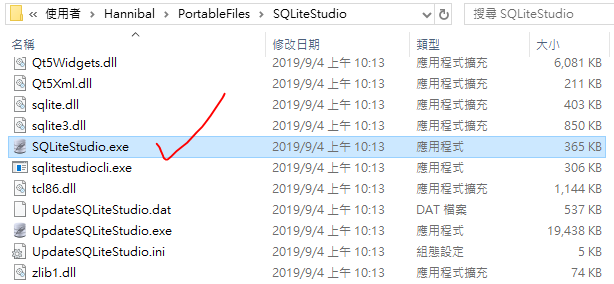
SQLite Studio 主要的功能簡介:
- 主畫面:

- Database→Connect to database
- Database→Disconnect from database
- Database→Add a database
- Database→Edit the database
- Database→Remove the database
- Database→Export the database
可以匯出的格式:HTML / JSON / PDF / SQL / XML
可以指定文字編碼(text encoding) - Database→Convert database type
以開啟SQLite3為例,可以指定轉換為:SQLite2 / SQLCipher / System.Data.SQLite / WxSQLite3 - Database→Vacuum
- Database→Integrity check
- Database→Refresh selected database schema
- Database→Refresh all database schema

- Structure→Create a table
- Structure→Edit the table
- Structure→Delete the table
- Structure→Create an index
- Structure→Edit the index
- Structure→Create a trigger
- Structure→Edit the trigger
- Structure→Delete the trigger
- Structure→Create a view
- Structure→Edit the view
- Structure→Delete the view

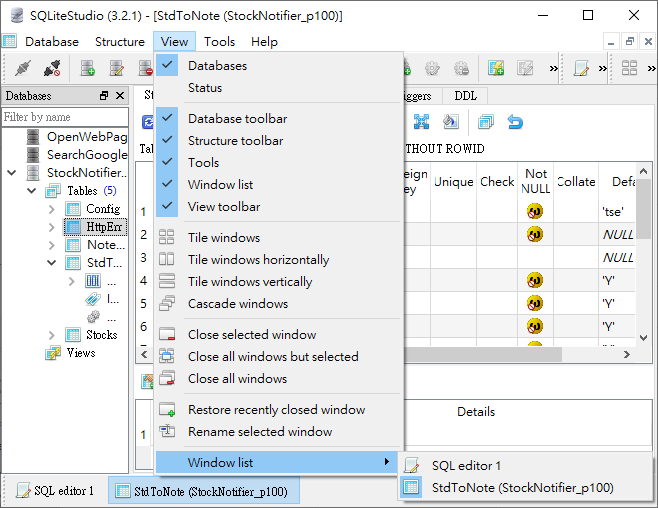
- View→Databases
- View→Status
- View→Database toolbar
- View→Structure toolbar
- View→Tools
- View→Window list
- View→View toolbar
- View→Tile windows
- View→Tile windows horizontally
- View→Tile windows vertically
- View→Cascade window
- View→Close selected windows
- View→Close all windows but selected
- View→Close all windows
- View→Restore recently closed window
- View→Rename selected windows
- View→Window list
- Tools→Open SQL editor
- Tools→Open DDL history
- Tools→Open SQL functions editor
- Tools→Open collations editor
- Tools→Import
- Tools→Export
- Tools→Open configuration dialog


- Help→User Manual
- Help→SQLite documentation
- Help→Open home page
- Help→Open forum page
- Help→Check for updates
- Help→Report a bug
- Help→Propose a new feature
- Help→Bugs and feature requests
- Help→Licence
- Help→About

SQLite管理工具DB Browser for SQLite
SQLite-tools雖然是官方網站提供的管理工具,但文字界面的操作方式,操作上總有親和力不足的狀況,還好除了SQLite-tools,並不是別無選擇,還可以有DB Browser for SQLite, SQLite Studio...,這裡先介紹DB Browser for SQLite。
DB Browser for SQLite官方網站:https://sqlitebrowser.org/
DB Browser for SQLite的下載網址:https://sqlitebrowser.org/dl/
提供各種作業系統(Windows, Mac, Linux ...) 安裝、免安裝、可攜程式的下載,或線上更新安裝的指令做法等。

以.zip (no installer) for 64-bit Windows 為例:(解壓縮後,可以直接使用)

DB Browser 主要的功能簡介:
DB Browser for SQLite官方網站:https://sqlitebrowser.org/
DB Browser for SQLite的下載網址:https://sqlitebrowser.org/dl/
提供各種作業系統(Windows, Mac, Linux ...) 安裝、免安裝、可攜程式的下載,或線上更新安裝的指令做法等。
以.zip (no installer) for 64-bit Windows 為例:(解壓縮後,可以直接使用)
DB Browser 主要的功能簡介:
- 主畫面→Database Structure

- 主畫面→Browse Data
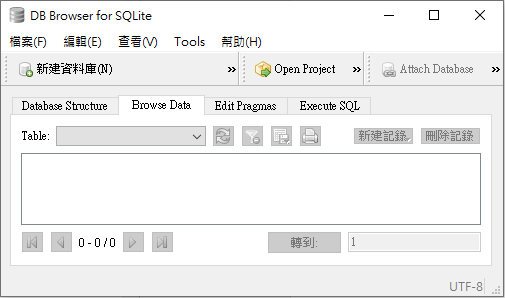
- 主畫面→Edit Pragmas
選項:Auto Vacuum / Automatic Index / Case Sensitive Like / Checkpoint Full FSYNC / Foreign Keys / Full FSYNC / Ignore Check Contraints / Journal Mode / Journal Size Limit / Locking Mode / Max Page Count / Page Size / Recursive Triggers / Secure Delete / Sychronous / Temp Store / User Version / WAL Auto Checkpoint

- 主畫面→Execute SQL

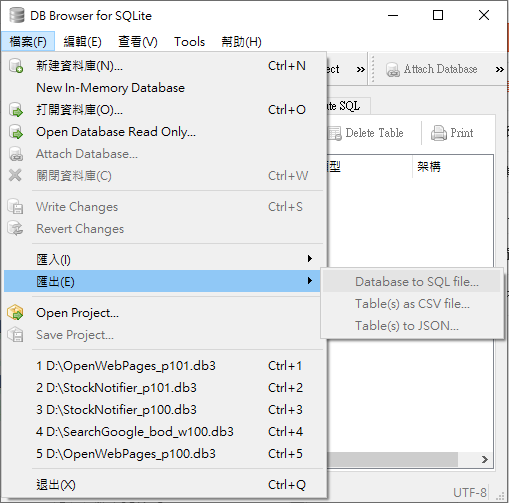
- 檔案→新建資料庫
- 檔案→New In-Memory Database
- 檔案→打開資料庫
- 檔案→Open Database Read Only ...
- 檔案→Attach Database ...
- 檔案→關閉資料庫
- 檔案→Write Changes
- 檔案→Revert Changes
- 檔案→匯入→Database from SQL file ...
- 檔案→匯入→Table from CSV file ...
- 檔案→匯出→Database to SQL file ...
- 檔案→匯出→Table(s) as CSV file ...
- 檔案→匯出→Table(s) to JSON ...
- 檔案→Open Project...
- 檔案→Save Project...
- 檔案→最近開啟過的五個資料庫檔案
- 檔案→退出
- 編輯→Create Table...
- 編輯→Modify Table...
- 編輯→Delete Table...
- 編輯→Create Index...
- 編輯→偏好選項...

- 編輯→偏好選項...→General

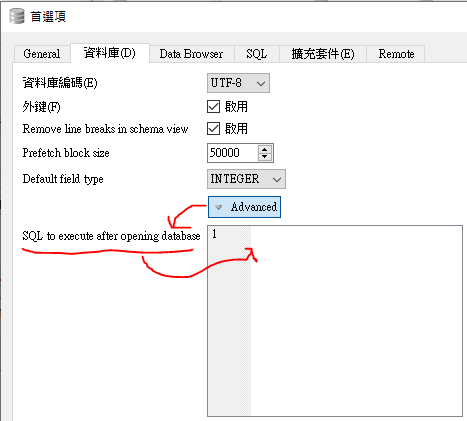
- 編輯→偏好選項...→資料庫
SQL to execute after opening database,這個功能可以紀錄資料庫的開啟歷程
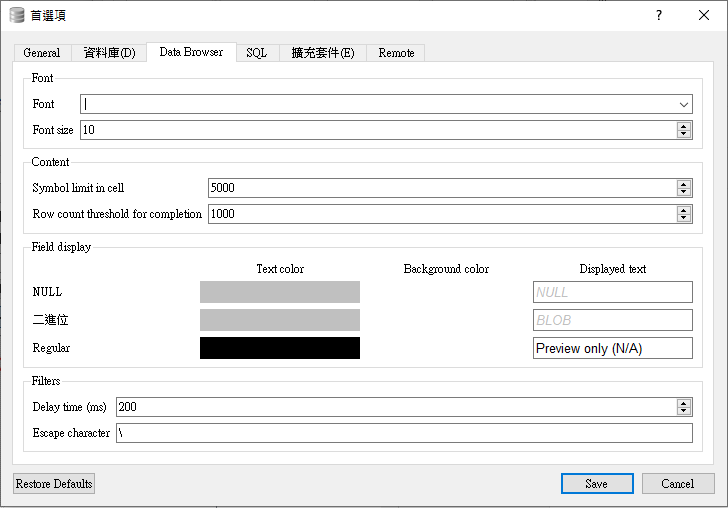
- 編輯→偏好選項...→Data Browser
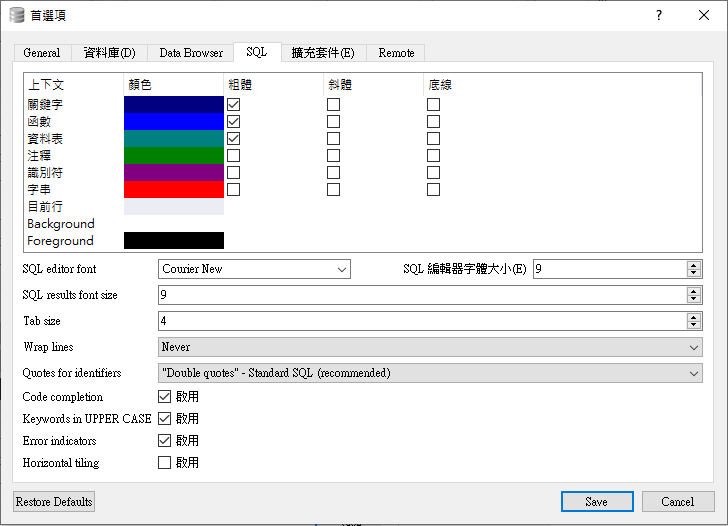
- 編輯→偏好選項...→SQL
- 編輯→偏好選項...→擴充套件

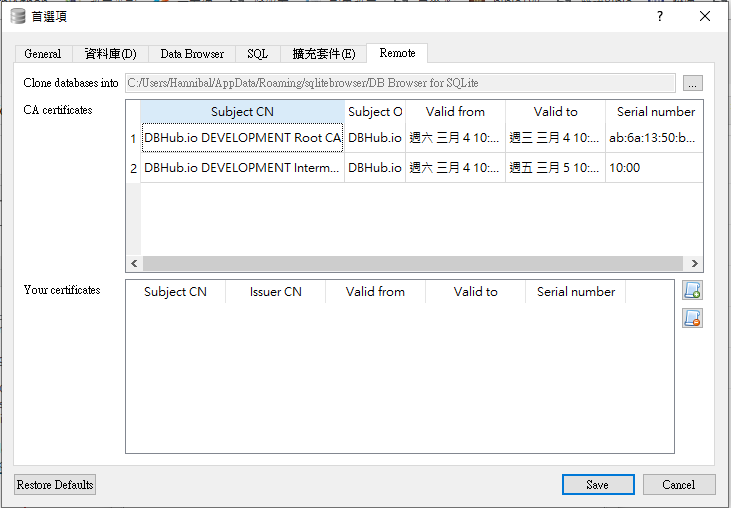
- 編輯→偏好選項...→Remote
- 查看→SQL Log
- 查看→Plot
- 查看→DB Schema
- 查看→Edit Database Cell
- 查看→Remote
- 查看→資料庫工具列
- 查看→Extra DB Toolbar
- 查看→Project Toolbar

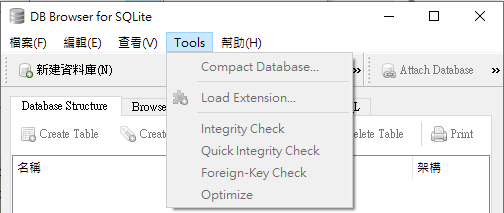
- Tools→Compact Database...
- Tools→Load Extension...
- Tools→Integrity...
- Tools→Quick Integrity Check
- Tools→Foreign-Key Check
- Tools→Optimize
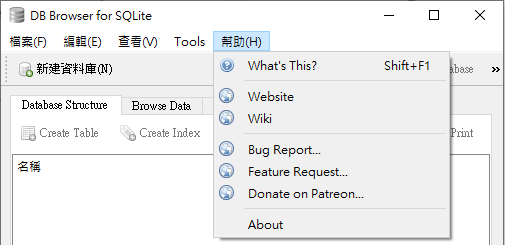
- Help→What's This?
- Help→Website
- Help→Wiki
- Help→Bug Report
- Help→Feature Request...
- Help→Nonate on Patreon...
- Help→About
SQLite管理工具SQLite-tools
這裡目前不會提到如何在程式中加入SQLite來處理程式要管理的資料,主要是介紹透過SQLite的管理工具,來管理在SQLite檔案中的資料。
SQLite的Slogan : Small. Fast. Reliable. Choose any three.
SQLite官網:https://www.sqlite.org/
SQLite Download Page : https://www.sqlite.org/download.html
在SQLite的下載頁面,以搜尋的方式找到所需作業系統的對應版本:
以下載 sqlite-tools-win32-x86-3290000.zip 為例

透過7-zip提供的CRC SHA 檔案驗證功能,計算所下載檔案的SHA1值:
(只要能計算SHA1都可以,不一定要用7-zip;但驗證是必要的,尤其是在非官方網站或知名度、信賴度較低)

SHA-1比對吻合,就可以安心的使用了...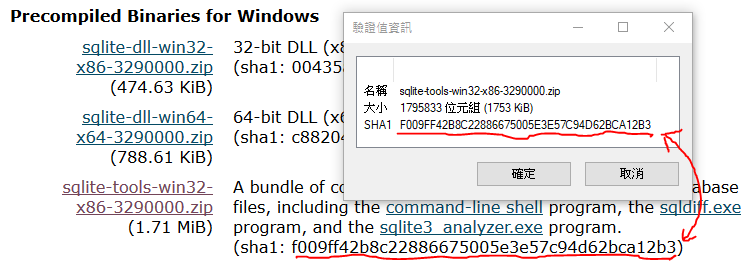
SQLite-tools不需要安裝,解壓縮即可使用 ... SQLite提供文字界面的操作方式,開啟sqlite3.exe後,可以使用 .help 查看相關管指令
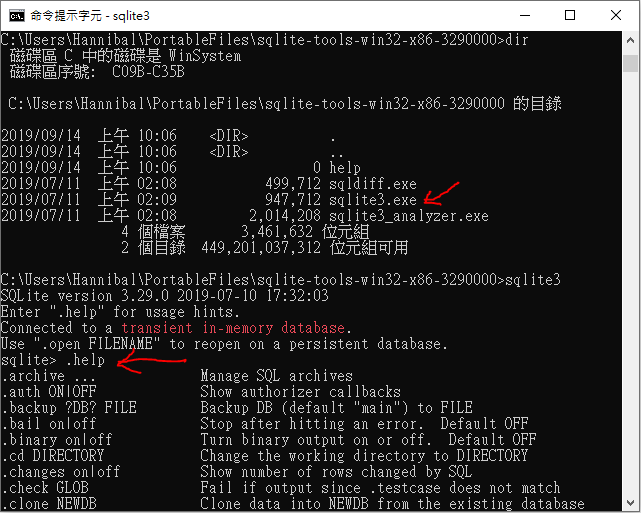
Help 指令清單
SQLite的Slogan : Small. Fast. Reliable. Choose any three.
SQLite官網:https://www.sqlite.org/
SQLite Download Page : https://www.sqlite.org/download.html
在SQLite的下載頁面,以搜尋的方式找到所需作業系統的對應版本:
以下載 sqlite-tools-win32-x86-3290000.zip 為例
透過7-zip提供的CRC SHA 檔案驗證功能,計算所下載檔案的SHA1值:
(只要能計算SHA1都可以,不一定要用7-zip;但驗證是必要的,尤其是在非官方網站或知名度、信賴度較低)
SHA-1比對吻合,就可以安心的使用了...
SQLite-tools不需要安裝,解壓縮即可使用 ... SQLite提供文字界面的操作方式,開啟sqlite3.exe後,可以使用 .help 查看相關管指令
Help 指令清單
| .archive ... | Manage SQL archives |
| .auth ON|OFF | Show authorizer callbacks |
| .backup ?DB? FILE | Backup DB (default "main") to FILE |
| .bail on|off | Stop after hitting an error. Default OFF |
| .binary on|off | Turn binary output on or off. Default OFF |
| .cd DIRECTORY | Change the working directory to DIRECTORY |
| .changes on|off | Show number of rows changed by SQL |
| .check GLOB | Fail if output since .testcase does not match |
| .clone NEWDB | Clone data into NEWDB from the existing database |
| .databases | List names and files of attached databases |
| .dbconfig ?op? ?val? | List or change sqlite3_db_config() options |
| .dbinfo ?DB? | Show status information about the database |
| .dump ?TABLE? ... | Render all database content as SQL |
| .echo on|off | Turn command echo on or off |
| .eqp on|off|full|... | Enable or disable automatic EXPLAIN QUERY PLAN |
| .excel | Display the output of next command in a spreadsheet |
| .exit ?CODE? | Exit this program with return-code CODE |
| .expert | EXPERIMENTAL. Suggest indexes for specified queries |
| .filectrl CMD ... | Run various sqlite3_file_control() operations |
| .fullschema ?--indent? | Show schema and the content of sqlite_stat tables |
| .headers on|off | Turn display of headers on or off |
| .help ?-all? ?PATTERN? | Show help text for PATTERN |
| .import FILE TABLE | Import data from FILE into TABLE |
| .imposter INDEX TABLE | Create imposter table TABLE on index INDEX |
| .indexes ?TABLE? | Show names of indexes |
| .limit ?LIMIT? ?VAL? | Display or change the value of an SQLITE_LIMIT |
| .lint OPTIONS | Report potential schema issues. |
| .load FILE ?ENTRY? | Load an extension library |
| .log FILE|off | Turn logging on or off. FILE can be stderr/stdout |
| .mode MODE ?TABLE? | Set output mode |
| .nullvalue STRING | Use STRING in place of NULL values |
| .once (-e|-x|FILE) | Output for the next SQL command only to FILE |
| .open ?OPTIONS? ?FILE? | Close existing database and reopen FILE |
| .output ?FILE? | Send output to FILE or stdout if FILE is omitted |
| .parameter CMD ... | Manage SQL parameter bindings |
| .print STRING... | Print literal STRING |
| .progress N | Invoke progress handler after every N opcodes |
| .prompt MAIN CONTINUE | Replace the standard prompts |
| .quit | Exit this program |
| .read FILE | Read input from FILE |
| .recover | Recover as much data as possible from corrupt db. |
| .restore ?DB? FILE | Restore content of DB (default "main") from FILE |
| .save FILE | Write in-memory database into FILE |
| .scanstats on|off | Turn sqlite3_stmt_scanstatus() metrics on or off |
| .schema ?PATTERN? | Show the CREATE statements matching PATTERN |
| .selftest ?OPTIONS? | Run tests defined in the SELFTEST table |
| .separator COL ?ROW? | Change the column and row separators |
| .sha3sum ... | Compute a SHA3 hash of database content |
| .shell CMD ARGS... | Run CMD ARGS... in a system shell |
| .show | Show the current values for various settings |
| .stats ?on|off? | Show stats or turn stats on or off |
| .system CMD ARGS... | Run CMD ARGS... in a system shell |
| .tables ?TABLE? | List names of tables matching LIKE pattern TABLE |
| .testcase NAME | Begin redirecting output to 'testcase-out.txt' |
| .testctrl CMD ... | Run various sqlite3_test_control() operations |
| .timeout MS | Try opening locked tables for MS milliseconds |
| .timer on|off | Turn SQL timer on or off |
| .trace ?OPTIONS? | Output each SQL statement as it is run |
| .vfsinfo ?AUX? | Information about the top-level VFS |
| .vfslist | List all available VFSes |
| .vfsname ?AUX? | Print the name of the VFS stack |
| .width NUM1 NUM2 ... | Set column widths for "column" mode |
2021-01-20
常見的關聯式資料庫
- 2019/09 關聯式資料庫排名 (參考:DB-Engines Ranking of Relational DBMS )
- 排名計算的方法:
Method of calculating the scores of the DB-Engines Ranking
2019-09-11
現有常見的各種SQL標準
- 什麼是SQL?
- SQL : (Structured Query Language),是用於管理關聯式資料庫管理系統(RDBMS)的一種程式語言。
- ANSI SQL
- SQL在1986年成為美國國家標準學會(ANSI)的一項標準,在1987年成為國際標準化組織(ISO)的標準。
- ANSI 所公布的SQL標準,陸陸續續有:SQL-86, SQL-89, SQL-92, 並在1993(SQL3), 2003, 2008,2011, 2016 有修訂推出。
- ANSI對SQL標準演進過程的一些說明。The SQL Standard – ISO/IEC 9075:2016
- T-SQL
- Transact-SQL (T-SQL),是在Microsoft SQL Server和Sybase SQL Server上,對ANSI SQL標準的實作。
- 目前Microsoft實作的Transact-SQL可支援到ANSI SQL-92標準。
- Microsoft Transact-SQL 參考資料。
- Sybase Transact-SQL User's Guide。
- PL/SQL
- PL/SQL(Procedural Language/SQL)
- 以PL/SQL作為定義、操作、控制資料庫及資料,有:Oracle, MySQL, PostgreSQL,
- SQL PL : IBM DB2。
- 資料庫系統,通常通都是以伺服器的型態建構,提供資料存取、管理的服務。但如果不需要同時提供資料的存取服務給多使用者,僅僅是要利用SQL語法的便利性、通用性,來達到資料管理的目的,自然不需要大費周章地建構資料庫伺服系統。這種情況下,使用檔案型態的資料庫,就可以滿足需多的資料庫使用的需求,例如:學習SQL語法、練習透過SQL操作資料。
Server-less的檔案行資料庫,有:SQLite, OpenOffice Base ...
當然如果你的學習目標是:大學資料庫系統的管理維護,這涉及的層面就比較多,建置一個資料庫伺服器,是必要的。
訂閱:
文章 (Atom)